Competitive analysis between HearForm and Sycle.net helps our mutual customers by ensuring that we always stay state-of-the-art. Although we are friendly competitors, we feel that it's important to point out some of the differences between the two primary choices in the hearing healthcare industry.
What does audiology office management software really cost? Click here to find out...
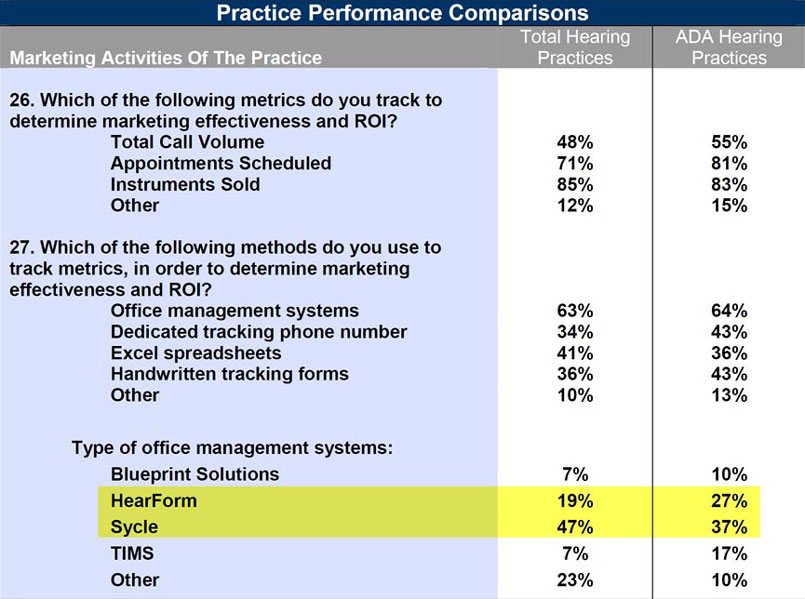
According to a 2012 Academy of Doctors of Audiology Survey (seen below), combined, Sycle and HearForm have about two thirds of the audiology community market. Sycle has a clear edge when it comes to the overall number of locations subscribed. This is in large part due to the fact that Sycle has negotiated contracts with large organizations such as Costco Hearing Aid Center (more than 400 Hearing Aid Centers in the U.S. http://www.audiologyonline.com/expo/costco-hearing-aid-centers)
Miracle Ear hearing aid stores use Sycle.net software. HearForm is currently used in over 2,000 dispensing practices. None of of our customers are Miracle Ear stores. Miracle Ear franchisees are given only one choice for an office management system... Sycle.net
The vast majority of Miracle Ear staff are not audiologists and therefore do not have the same professional needs that an audiology practice might have. Sycle.net may be a perfect fit for Miracle Ear Franchisee owners.
A past President of a major hearing aid manufacturer told us that they do not refer their customers to HearForm, because we do not offer them a commission. Our goal is to earn referrals because of our product, not our revenue-sharing policies.
Many other organizations, will not recommend any other office management system, but Sycle for the same reason. We would encourage these organizations to consider recommending products and services based upon merit, rather than commissions and personal relationships.
Ask AHAA if they have any bias towards recommending Blueprint Solutions OMS, strategic partners with Oticon. Blueprint resides in the same building as Grayson-Stadler, another company owned by the William Demant Holding Group (the parent company of AHAA.)
Ask Starkey if any Starkey employees or management receive any compensation in any way for recommending Hearing Fusion.
The ADA OMS Survey
Notice below, that when survey respondents were limited to ADA members, (typical independent and very forward thinking professionals), HearForm's market share went up by 42 percent (not points) from 19% to 27% of the market. Conversely, Sycle's market share went down 21 percent (not points) from 47% to 37%. When you remove Costco locations, Miracle Ear, Audibel, etc.. serious professionals are much more likely to choose HearForm.
BEFORE losing hundreds of Starkey stores, Sycle was still 10 points higher than HearForm, but let's look at what's going on behind the scenes...
HearForm has advertised in journals only twice in 23 years. (Both half page ads.) Sycle advertises full page ads every month, often in multiple journals at a cost of $3,000 to $5,000 per ad. Who pays for those ads? Sycle users pay, every month. HearForm gets all of its business from our web presence and primarily, word of mouth. Your colleagues are our best advertisers. People like to tell others if they really love a product. Our minimal advertising budget helps HearForm be the most affordable software in the industry, over time.
HearForm has NO FINANCIAL RELATIONSHIP with any manufacturer. We choose to remain completely independent. Even with Sycle's thousands of referrals from Sonus-Elite, Costco, Miracle Ear, Starkey and all the others mentioned above, HearForm comes in at a close second place. If we advertised every month and paid supplier referral fees and built strong personal relationships with decision makers, HearForm would have a significant greater market share. Instead, we choose to focus on our product development.
Ask Sycle what their total advertising budget is each year. Along with trade shows, Journal ads, Audiologyonline, etc..., it is likely over $100,000 to $200,000. HearForm spends less than $1,000 per year...and we are still only 10% behind Sycle with ADA members. We pass the savings to our customers, but more importantly, we invest in a quality product much more than promotion.
Note: The 2012 market share numbers listed below have undoubtedly reduced Sycle's overall market share, since Sycle lost hundreds of its customers in 2014, when Starkey migrated those offices to HearingFusion, Starkey's new partner.
Sycle.net and HearForm Comparison
Executive Summary
Sycle.net used to have one advantage over HearForm Software. Now that HearForm optionally offers its software online using a browser or remote desktop, that Sycle advantage has disappeared. (HearForm is available ONLINE - In the Cloud!)
A thorough comparison between the two products will show that HearForm is the best choice for the vast majority of Hearing Care Professionals.
HearForm is:
Significantly More Powerful
Significantly More Flexible
Significantly Less Expensive
Really
Read on if you'd like to see some of the details. We will shortly post our new page that offers a more frank discussion of Sycle for those that don't mind reading details that might seem agressive to some.
The choice for Hearing Healthcare Practice Management Software has become more focused.
Siemens Practice Navigator is no longer available and Siemens has stated that they will not support those previously sold systems.
Starkey has stated that they no longer plan on putting any additional investment into the ProHear OMS. Starkey will no longer support older versions of ProHear.
Since being purchased by Computers Unlimited, TIMS (Formerly Online Claims Audiology) has diminished significantly in market share.
The two dominant players in the industry are now HearForm Software and Sycle.net. Both systems have their own strengths and weaknesses. HearForm is primarily office based, while Sycle.net is a completely web based monthly subscription.
What are the differences between HearForm Software and Sycle.net?
HearForm is, without question, the most flexible and powerful software in the hearing healthcare community. It may take a bit of training, but once you learn to use HearForm's tools, you'll wonder how you ever got along without it. Read our testimonials
Sycle is somewhat easy to use. We often respectfully compare Sycle.net to a nice Golf Cart. Just sit down, step on the pedal and go. Release the pedal and stop. Basic. But... you wouldn't want to get on the freeway in a golf cart.
In what way is Sycle.net better/easier than HearForm Software?
Sycle is easy to set-up in an individual office or even more so, in multiple offices. All that is required is a compatible web browser. (QuickBooks synchronization and electronic billing do require more advanced set-up.) Because Sycle users simply log onto the web, no additional networking is needed (as long as a computer has high speed internet access.)
Note: Sycle’s new fee structure is based on separate office locations. Each location will be treated as a separate office and will be billed $149 per month. ($50 per month for satellite clinics open 2 days per week or less.)
If you have just one office location, with many staff members and need only very basic office management software, Sycle may be a better choice for you.
HearForm, on the other hand, has some pluses and minuses in this category. HearForm is available online for a hosting fee. The hosting company provides the server, back-ups and all other hosting services. HearForm will save you thousands or tens of thousands of dollars over a period of time. Contact us for details about this new option. 888-453-8806
MAIN OFFICE PRICING
HearForm
$5999 payable as follows... $999 depost and $199 per month for 25 months. (no interest.) This is the total purchase price to OWN HearForm software.
HearForm includes two licenses of FileMaker Pro. (FileMaker is the engine that runs HearForm and is needed on each computer. Filemaker runs on both Windows and Macintosh computers.) Additional licenses of HearForm with FileMaker Pro, beyond the included two, are $199 each (one time.)
Sycle
Sycle.net is offered as a subscription for $149 per month per location. A discount is offered for those willing to sign a 1 or year commitment, but you must stay with Sycle for that period of time or pay a penalty.
BRANCH OFFICE PRICING
Stand alone branch offices pay a onetime discounted fee of $1499.00 (One license of FileMaker Pro is included.) If a support plan or training is desired for remote offices, it can be purchased separately. There are no monthly fees for additional office locations.
The 5 year Full Time Remote Office savings scenario...
HearForm
$1499 -- Includes one copy of FileMaker Pro (you can add additional computers to use HearForm in your branch office for $199 - onetime).
The HearForm Savings Advantage is clear ($7,441 savings over five years and the savings continue at $1,788 per year.)
Sycle
$8,940 -- $1,788 per year (remote office) times 5 years = $8,940.00 (Note: If you are willing to commit to a long term contract with Sycle, they offer a 1 year rental option of $1,549 per clinic or a 2 year contract price of $2,899. Of course, in the event that you want to leave Sycle early, you cannot just walk away from those contract commitments.)
This significant HearForm value is only attractive if HearForm provides comparable or better features and benefits than Sycle. The rest of this comparison page will demonstrate that, while HearForm is much less expensive, it is clearly superior to Sycle in almost every way.
UPDATE: Until recently, we showed Sycle.net screenshot images below that were taken directly from Sycle’s Software and Website. We thought it would be fair and honest to show Sycle's actual screenshots from their software. Unfortunately, Sycle asked that we remove any images of their software, so you'll have to trust us when we simply write about how Sycle works.
(Note: 9-5-2015 Sycle has just created a new website and we will be updating this information as soon as we receive new information from our request.)
Sycle.net
Sycle’s very own Top Ten Reasons to purchase their product are listed below.
BTE Inventory: Track your hearing aid stock efficiently with our BTE inventory.
Battery Lookup: No need to go digging through patient files.
Order Form: Stop filling out order forms by hand.
Call Backs: Use Open callbacks to schedule patient follow up reminders.
Purchase Agreement: Upload a purchase agreement to your Sycle account and never have to fill them out by hand again.
Serial Number Search: Start searching for patients and their hearing aid equipment by simply entering the hearing aid serial number into any patient search field.
Custom Groups: Set up custom groups and start to track and mail to any sub-group of patients.
Auto Recall Mail: Enjoy the peace of mind that your patients are receiving their ticklers while never having to lick a stamp.
Sales Report: Manage your business with real time sales reports.
QuickBooks Sync: Sync up with QuickBooks using our interface tool.
Let's look at these Sycle features in depth...
1. BTE Inventory
HearForm lets you track inventory quicker and create macros to duplicate repetitive Inventory/Loaner tasks. HearForm lets you search for all stock, loaners and demos with one click or use multiple search criteria to find just the right instrument for that hard to fit loss. Sycle does not allow anything like that kind of detailed searching or the ability to create memorized searches.
2. Battery Lookup
Since HearForm allows unlimited Hearing Aids per patient, HearForm has the edge here. Patients can have multiple battery sizes on their different back-up and current aids. HearForm allows you to search in all battery fields. Sycle does not allow you to search ANY battery fields.
HearForm battery sizes are automatically color code displayed on the patient screen for quick identification. (Size 10 - yellow, size 13 - orange, etc.)
3. Order Form
The Sycle order form is very basic and not at all customizable. HearForm has completely customizable order forms for:
New Instruments
Repairs
Ear Molds
Return for Credit
Loss and Damage
4. Call Backs
HearForm has a big edge in this category. With Sycle you'll need to click 4 times to enter a call back. First, figure out what date is 5 weeks from now. Then...
Select a Month
Select a Day
Select a year
Click save
You have now entered the maximum of Callbacks for that patient in Sycle.
HearForm also allows unlimited recalls per patient. HearForm lets you set multiple 6 month or 1 year recalls for that patient with one click. You can also set an entire group of patients for a recall at once. HearForm’s recall system is much more flexible. We have customized our Superbill to automatically enter detailed recalls by clicking on the Superbill Item. With one click, HearForm will create and date the recall with the recall purpose and professional.
Easy Entry Quick Buttons
Unlimited Recalls per patient
Multiple Recalls per patient with One Click
Multiple Patients with One Click
Can be tied to the Superbill
Sycle Recall Screenshot Image was removed per Sycle's Request
5. Purchase Agreement
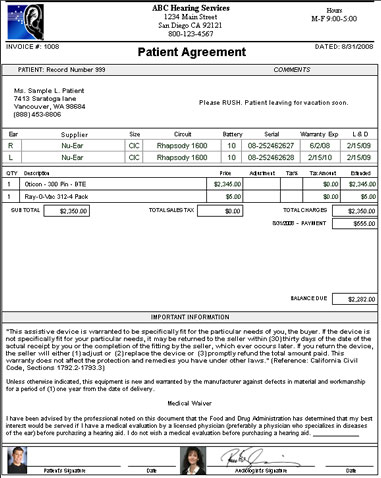
Sycle allows you to upload your purchase agreement for partial customization, but that process is very limited. Sycle does not reproduce your actual agreement. They simply add some of your text to their template. HearForm allows you to use 95% of your original agreement. You can print a very professional looking document, as opposed to a basic looking form.
If desired, HearForm can merge the patient’s photo to the signature line, as well as the audiologist’s photo and electronic signature. The document creates a highly professional impression.
HearForm also prints other professional looking financial documents, such as Service, Repair, Delivery, Return/Credit and Commission Receipts.
HearForm now offers an app for your iPad or iPhone that allows your patient to sign any purchase agreement ( or any other document within HearForm) electronically. The patient signature is automatically stored with their electronic record, dramatically reducing the need for printing. The patient's receipt/invoice can then be emailed to the patient in seconds. This type of cutting-edge technology reinforces your professional image.
HearForm Purchase Agreement
Sycle.net Purchase Agreement
Sycle Agreement Screenshot Image was removed per Sycle's
Request If you have ever seen the very basic QuickBooks Invoice, you'll have a good idea about Sycle's very basic looking agreement.
6. Serial Number Search
If you have the whole serial number, both programs work well. HearForm is quicker in this category, but Sycle does let you find your match after about 30 seconds. The big difference is if you only have a partial serial number. Sycle simply lets you search the serial number field. HearForm lets you add additional fields to the search criteria.
Let’s say that you find an aid in the lab. Part of the serial is not readable, because of some buffing or grinding. You know it’s a Phonak, starting with 08-123####. In HearForm you simply click FIND and select Phonak 08-123. A match or a series of matches will popup. You can add unlimited other criteria to your search, as well. Sycle permits you to search only the serial field.
In fact, that is one of the major differences between Sycle and HearForm. Sycle defines which information you can query. Sycle.net only allows you to search the following nine (9) fields...
First name
Last name
Phone
ZIP Code
Date of birth
Patient ID
Referring physician
Invoice number
Serial number
HearForm lets you search any number of fields in any combination. HearForm can memorize those searches and repeat them with the click of a button. Sycle.net does not allow any custom searches.
7. Custom Groups
Without a doubt, it helps to further differentiate your patient records by detailed criteria. Sycle gives you the option to set one type of patient apart from others. Sycle allows you to add your own custom choices to the Custom groups (such as Elk’s Club, ABC retirement Center, Etc...)
HearForm does all of the above plus allows you to import your custom choices for easy set-up. More importantly, HearForm allows you to Create Unlimited New Custom Fields for other differentiation needs. If you are not satisfied with the fields that exist in HearForm – change them! Add new fields… and macros… and screens… and…audiograms… and letters… and forms…and reports. You have control over your software.
Sycle cannot allow their customers to make such modifications, because Sycle uses one database for all of its customers. While you can add data to your session of Sycle, you cannot modify the database structure. Unless you like a one-size-fits-all approach, that’s a huge limitation for your staff.
8. Auto Recall Mail
Sycle has a great set-up for automated mailings. Here is a list directly from Sycle’s Automated Letter Mailing Section:
Birthday Letter
Annual Hearing Letter
Clean and Check Letter
Confirmation Warranty Letter
Test No Sale
Thank You Letter
Repair Rebate Letter
Sycle states that “If you have your own or additional letters they can be added to your marketing page.” We have been told by many ex-Sycle users that they could only submit very basic letters for that purpose.
These letters can be sent out automatically to patients at predetermined intervals. Sycle’s computer figures out when it’s time to send a warranty letter and at the appropriate time, that letter is mailed to the patient on your behalf. That is a very convenient benefit.
Sycle advertises that they charge a fee of $0.45 to $0.65 cents plus postage for each letter.
How does HearForm stack up to that? We respect Sycle for their optional service, but we like to err on the side of choice and savings. HearForm users can automate the sending of all the letters mentioned above and hundreds more, but most of our customers print and mail the letters themselves.
Most offices now have a printer that can handle 100s (or 1000s) of printed letters per day. It’s very easy to print letters and envelopes in HearForm. Built in scripts and Macros find expired warranties, birthdays, “Time for a new test” and “Ready for new hearing aid” patients in seconds. You then have control over who gets what letter and when.
Sycle’s eight letters are nice, but HearForm’s hundreds of choices create a much more refined group of patients. For example, HearForm will quickly find all patients that have a severe loss and have not purchased for over 3 years. You can then send that group of 25 letters to your printer and you’re almost done. You do need to fold the letters, stuff them into the envelope and apply a stamp.
If you mail 200 letters a month, here’s how costs stack up...
Sycle: 200 Letters = $198.00 Sycle’s Fee including Postage
From Sycle's website FAQs on 9-17-2011...
Q. What is the price per piece charge for the automated mailings? Direct mailings?
A. Most items range from $0.45 to $0.65 per item plus postage, depending on whether you choose color or black and white.
That's an average of 55 cents plus current postage of 49 cents per letter. ($1.04 per letter total.)
This comparison is what HearForm is all about... saving you money.
While we could offer an almost identical paid service and profit from that offering, HearForm looks for ways to reduce your monthly obligations.
HearForm allows you to quickly isolate a very specific and targeted group of patient records and then export those records to the vendor of your choice. under the previous scenario, Sycle.net requires you to go through their company-owned mailing house. That means you pay a higher price then you could get on your own using HearForm. Because you can choose a more affordable mailing service, HearForm does not profit in any way or receive any commission.
Sycle.net has received hundreds of thousands of dollars in extra fees by requiring Sycle customers to use its exclusive "Top Ten Feature" for auto recall mail.
In this reasonable scenario, Sycle can easily cost your practice almost $200 more per month than HearForm... or $2,400 more per year.
9. Sales Report
Sycle has a number of reports. Our favorite is their “Quick Report.” From Actual Sycle’s Software...
Sales Repors
Quick business
Sales summary
Sales
HA sales
Total sales
Zip code sales
Open invoices
Aging
Inventory
Marketing Reports
Referrals
Marketing
Appts
Appt status
Appt result
HCFA status
HCFA billing
Intake
Provider avail
Clinic avail
Pickup
The 20 reports listed above are very helpful. The Sales Report sub-summarizes by the following four categories… Total Sales, Total Exchanges, Total Canceled Orders, Total Replacements There are a number of columns within each category that are reported on… Sale Date, Delivery Date, Return Date, Staff, Patient, Office, Type, Description, Referral Source, Sub-referral Source, Ref Description, Notes, CPT Code, Gross Price, Discount, Sales Tax, Net Price, Receipt Paid.
Sycle.net has done a good job with reports.
HearForm Report Module
HearForm has the same reports, but also has hundreds of other reports that do not exist in Sycle.
HearForm has a tab under reports called “Count.” The count reports will quickly show you how many of your found set match your search criteria. For example: You do a quick search for all patients who have been referred by a direct mail piece or newspaper ad this month. Click a button and HearForm will list how many of those patients live in each city or zip code.
How many patients in general were referred by Physicians and then summarized by which physician? You can even see how much revenue (including profit) was received from each referral source.
Best of all, unlike Sycle’s prepared reports, you can create any number of your own customized reports. Our customers often request a reporting capability that is unique to their particular needs. If you can think of it, you can likely report on it in HearForm.
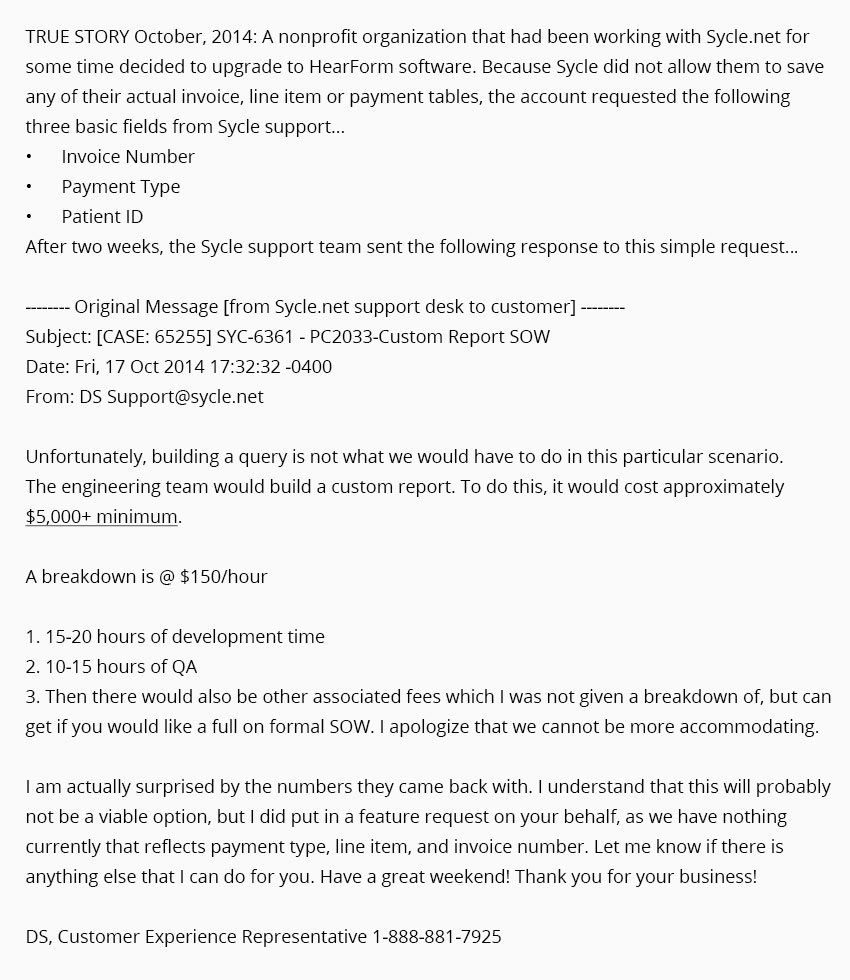
Why do include this true story on our comparison page? We think it's important that professionals understand the severe limitations of working with a one-size-fits-all browser-based database.
In addition to the Reports mentioned above, Sycle also has “Marketing lists” listed below.
Birthdates
Insurance Patients
Physician Referral
Tinnitus
Speech Pathology Patients
Current Equipment
Monaural Patients
Provider
Warranty Expiration
Custom Patient Groups
Last Hearing Test Date
Patients last seen
Provider & Purchase Date
Hearing Aid Type
Patient Summary
Zip Code
Purchase Dates
Hearing Loss
Patient Type
Tested not Sold
Recall List
These 22 lists are basic spreadsheet views of the exact same 21 columns in each list. That's not very helpful and very inflexible.
First
Address1
E-mail address
HIPAA Waiver Signed
Last
Address2
Area Code
Insurance Patient
Preferred Clinic
City
Phone
Ins 1 Source
Date of Birth
State
Do Not Mail
Ins 2 Source
Purchase Date
Zip
Do Not Call
Ins 1&2 Company
The lists are not editable or customizable. You always get the same 21 column header data for each of the 22 Marketing Lists. We’re not sure why Sycle can’t limit the Birthday Marketing list to exclude columns that are irrelevant.
HearForm allows you to create an unlimited number of lists, all with whatever field columns you desire. (Not the same 21 columns each time.) Each list appears exactly as you want it to appear. HearForm lets you fine-tune the lists far beyond Sycle’s capabilities. For Birthday lists, Sycle lets you specify birth month, the assigned office and whether the patient is current, prospect, competitive or archived. HearForm lets you choose unlimited combinations to narrow down your search.
Let’s say you want to send birthday cards out twice a month, so that patients born on the 30th of the month don’t get their cards too early. With HearForm, you can select a date range within the month, exclude infants, only include active users for a given audiologist, etc.
HearForm’s lists get you the data you want and are exportable in many different formats, not just Excel.
10. QuickBooks Sync
On December 13, 2013, Sycle released a "New and Improved QuickBooks Synchronizer." Because of this modification, we have removed our previous comments about their "Journal Entry" Synchronizer. Because we are not yet aware of the specific details of this new feature, we will withhold comments for the time being.
Preliminary Conclusions
Restating, Sycle’s Top Ten Reasons to subscribe to their software...
BTE Inventory
Battery Lookup.
Order Form
Call Backs
Purchase Agreement
Serial Number Search
Custom Groups
Auto Recall Mail
Sales Report
QuickBooks Sync
In 9 out of these 10 Sycle Features, HearForm is better or significantly better than Sycle.net. (The QuickBooks comparison is still unknown) We did not randomly choose 10 areas where HearForm happens to be better. We did not "cherry pick" from our greatest strengths. These are Sycle's promotional features.
There are many more compelling reasons to choose HearForm instead of Sycle. Please continue reading.
Every Office Management System needs to accomplish basic office tasks. These include...
SCHEDULING
CLAIMS/ELECTRONIC BILLING
FORMS
LETTERS
ENVELOPES
LABLES
MARKETING
FINANCIALS
RECEIVABLES
REPORTING/TRACKING
CHART NOTES
BATTERY CLUB
SUPPLIER FORMS
DOCUMENT/IMAGE STORAGE
Let’s look at how HearForm and Sycle work with each of these basics.
CLAIMS/ ELECTRONIC BILLING
Sycle
Sycle charges a $199 set-up fee for each office plus an additional one-time setup fee of $75 per tax ID. monthly fees per tax ID are $32.00 per month PLUS 37 cents per claim.
That means that if you send 150 claims a month, you’ll pay $32.00 plus $55.50 for a total monthly fee of $87.50 per month.
HearForm
HearForm’s primary partners are Optum/ENS Health and Emdeon, but you can also use HearForm to work with E-Claims, Office Ally, National EDI, Apex EDI or Medavant. You set up the relationship and get the best pricing possible. For example Optum/ENS Health has arranged special pricing...
HearForm's $199.00 set-up fee and $40 per month. Under the scenario mentioned above, you will save $47.50 per month using HearForm for 150 claims processed.
If you send a lot of claims, you’ll save a lot with HearForm over Sycle.net
FORMS
Sycle
No custom forms can be added or created. NONE. Sycle has advertised full-page ads in the Journal the last several months saying that they provide "Free unlimited support. No charge. Zip. Zilch. Nada. None." We believe that it's very easy for Sycle to provide support at no charge when their support desk's most common response to requests is "I am sorry, but you cannot do that in Sycle."
HearForm
Add unlimited custom created forms. Insert and match your current forms exactly. HearForm will automatically merge patient information right on to your forms. We can also create forms for you. We have done so for school districts, major Universities, Buying groups, two of the top five hearing instrument manufacturers and practices on every continent. We include medical forms from the UK and Australia, forms from Jordan to Cyprus, Spanish forms and the DVA form for Canadian Customers.
Your forms – Your way.
Finally, HearForm offers an app for your iPad or iPhone that allows your patients to electronically sign and store their signature to any form or letter. This allows you to go relatively paperless in your office.
LETTERS
Sycle
The Sycle.net Letters Screenshot Image was removed per Sycle's Request. (Essentially, the image showed the eight letters that sycle offers its customers.)
Since 2002, Sycle.net has offered its customers the same 8 letters (as of 7-21-2015.) You do have the ability to modify those letters with your own text, however, modifications are for basic text only.
Other than a basic logo, additional graphics or merge fields cannot be placed into these 8 limited letters.
HearForm
HearForm has over 350 pre-written letters and template locations for 1000’s more (for your own creative letters.) Our customers have modified the letters with automatic merge fields (i.e. unique patient specific data from other parts of the program is automatically merged into each separate letter.)
Automatically merge your audiologist's photos and scanned signature onto any form or letter, automatically.
Quickly print letters and envelopes for virtually any office routine.
Personalized Letters
HearForm adds what may be one of your favorite enhancements (after you understand it and begin to make use of it.)
You can now send unlimited personalized letters to every patient in your database.
This feature is not limited to sending letters to patients.
You could add a record in HearForm for a supplier, physician or insurance provider. You could then send personalized letters to each of those entities. For example: You might add a new record called Widex. (change the Patient Type to Supplier, if you’d like.) Every time you want to send a letter to your Widex rep, you could write it in HearForm and then have a history of that letter. You could even paste in e-mail text and record that with each supplier record.
Example 2: Add a record for Blue Cross to the overview screen. Now, create a new letter every time you need to communicate with Blue Cross concerning any patient. You’ll have an exact history, fully searchable, of every letter you write from this point forward.
LABELS
Sycle
Printing Labels from Word in Sycle’s own words… (a major hassle compared to the literally seconds it takes to do the same thing in HearForm)
(Text from the Sycle website listed above.) This document will explain how to download a list from sycle.net into an Excel file and then walk you through the steps of creating labels in Word.
Downloading a list from sycle.net’s saved lists
There are two places in sycle.net where you can download a list of patients.
You can go into the reports section and click on the marketing list.
Once you choose a report, it will ask you to clarify your search (i.e. do you want the list to run for your prospects and competitive users as well as your customers).
Once you have this done, click on View Report to view the report on the screen or hit download to put it into an Excel file. You will be asked where you would like to save the report. I recommend saving it to your desktop because it’s easy to find.
Downloading a list from sycle.net using your own criteria If you would like to run a list outside of the lists that are saved in the Marketing Lists section, you will first need to create a list of your database.
To do this, go to the administration section and choose the Database Backup option.
Then you will need to select what you would like to download.
Once you have made your selections, you can hit the Download button. Again, you will be asked where you would like to save the Excel file. Again, I would recommend saving it to the desktop so that it is easy to find.
Creating Labels using Microsoft Word
To create labels, open up Microsoft Word, go to the Tools Menu and choose the Letters and Mailings option. This will open up another menu and choose Mail Merge Wizard.
This will open up a wizard on the right hand side of your page that will walk you through creating your labels.
First, select that you would like to create labels and then hit next at the bottom of the screen.
On the next screen, it will default to changing the document type. Click down below on the label options and select which labels you would like to print on.
Once you have chosen your labels, you will now see those labels appear on the left hand side and now the “Use current document” option is selected. Go ahead and hit next at the bottom of the screen.
On the third screen, you now can indicate that you would like to use the list you downloaded from sycle.net. Leave the selection as “Use an existing list” and click “Browse”. This will allow you to go find the list you downloaded.
If you haven’t already sorted the list in Excel, you have the option of sorting the list by clicking on any of the column headings. You can also uncheck records that you don’t want to print a mailing label for.
The next section allows you to set up how you would like the label to appear. Go ahead and hit the Address block option. In the window that comes up, pick the
Match Fields button in the bottom left hand corner.
Now you will need to assign fields to each of the corresponding address fields (last name, first name, etc…). You can get the field names from the same screen where you sort your list (see screenshot w/ instruction #6 above). Once you have done that, go ahead and hit OK.
You label area should now look like this:
Go ahead and click on the Update all labels button in the Replicate labels area to copy that same address block throughout your labels.
Click on Next: Preview you labels at the bottom of the page to see the labels as they will appear. You can page through them one at a time using the forward and forward and back arrows under the Preview your Labels heading if you would like. If you need to edit or remove any labels you missed, just click on the link “Edit recipient list” on the right hand side.
Click on the Next: Complete the Merge link at the bottom of the page to merge the data with the label template. You then have the option to begin printing or to again view the labels before you print them.
Time required? You decide.
HearForm
To start printing a sheet (or sheets) of labels in HearForm, follow these directions...
Avery 4022 Avery 8167 Avery Tab Inserts for Dividers
Avery 4027 Avery 8250 Avery WorkSaver Divider 5
Avery 4029 Avery 8252 Avery 5384
Avery 4030 Avery 8253 Avery 5385
Avery 4031 Avery 8254 Avery 5386
Avery 4032 Avery 8257 Avery 5388
Avery 4033 Avery 8315 Avery 5389
Avery 4035 Avery 8373 Avery 5395
Avery 4037 Avery 8387 Avery 5095
Avery 4052 Avery 8389 Avery 5096
Avery 4060 Avery 8660 Avery 5097
Avery 4062 Avery 8931-CD/DVD Jewel Avery 5126
Avery 4065 Avery 8931-CD/DVD Label Avery 5160
Avery 4067 Avery R-4013 Avery 5161
Avery 4076 Avery Index Maker 3 Tab Avery 5162
Avery 4088 Avery Index Maker 5 Avery 5163
Avery 4090 Avery Index Maker 5 Tab Avery 5164
Avery 4109 Avery Index Maker 6 Avery 5196
Avery 4110 Avery Index Maker 8 Tab Avery 8763
Avery 4207 Avery Index Maker 10 Avery 8769
Avery 8662 Avery Index Maker 12 Avery 8663
P-Touch Brother QL Series
ENVELOPES
Sycle
We could not find any information in the 62 Page Sycle.net User Guide or any mention of envelopes in the Sycle software. Sycle will print your letters for you (45 to 65 cents per letter plus postage.) We can only assume that if you want to print an envelope or a series of envelopes that you’ll need to follow a similar procedure for printing labels (i.e. Go to reports, download list of patients, open the download in Excel, edit the list to include only those desired, import into Word and start the WORD envelope series of steps.
HearForm
Click the #10 Envelope Button to print a standard envelope.
Or
Click the #9 Envelope Button to print a return address envelope.
The Envelope will automatically print the address of the assigned office for each individual envelope. The assigned practice logo will print on the envelope, if desired.
Preprinted envelopes and letterhead may be used at any time.
Time required: 3 to 5 seconds per envelope printed individually. Batch printing of envelopes is even faster.
Help and Training
Sycle
Sycle offers 17 training videos on their site.
Sycle.net has added training videos to their website. The videos are helpful but far from thorough. The average video length is approximately 2.5 minutes. HearForm’s much more complete library of 125 training videos average is 7 minutes per video.
HearForm
See the following link for a list of HearForm training videos.
Let’s look at what those training video numbers mean.
One might argue that having limited videos just shows that Sycle is easier to use. “You don’t need much training with Sycle.” There is some truth to that. Here is an example right from Sycle.net...
The Sycle training video called Patient Search (56 Seconds) is over in less than a minute. That’s sounds pretty easy. The problem is that there’s not much more that can be taught on that subject.
HearForm can also show you how to find a patient in 56 seconds, but HearForm does not’t have to stop there. HearForm is significantly more powerful than Sycle.net in its ability to locate the precise information you want.
IMPORTANT: This concept is crucial to understanding one of the key differences between the two products. Sycle.net does not allow you to search just any field in their software. You can only search nine (9) fields, such as serial number and patient name. This is a highly restrictive approach to accessing your data.
HearForm allows you to search (query) any number of combinations to isolate a desired group of patients or prospective patients.
For example: Let’s say that you wanted to find all patients that were fit with hearing aids in the last three years. Add to that, you only want those that have a severe to profound loss. Make those just females over the age of 55. Narrow that down to those that already have a high power BTE in their left ear (etc…).
That may seem a bit silly, but you could easily find those patients in HearForm. You could not begin to search like that in Sycle. With Sycle you get to search what the programmers predetermined for you. Remember that those programmers have not worked in a hearing aid office and don’t do their own support. They may not be aware that you need more flexibility then the very limited search choices in Sycle.
Searching in HearForm is much more powerful. That’s one reason that our training videos are longer. Sycle does not have all that much to explain.
An owner’s manual is much shorter (and easier to read) for a golf cart than it is for a Ferrari. That doesn't make the golf cart better. They are created for two different purposes and use two different technologies.
Training (Tech-Support) Staff
What happens if HearForm or Sycle.net goes out of business (for any reason?)
That is a very fair question to ask and one that should be explored. Let’s look at some history in the Hearing Healthcare Industry...
Many years ago some pioneers in this industry saw the need for automation in the hearing healthcare office. Computers were still just becoming affordable for small offices. Some of those early software companies were
Swensons Software
HearWare (the original, not the newer Canadian company)
Clarity Software
Swensons and HearWare have been gone for many years now. Clarity was an excellent piece of software at the time, but the two co-owners had a disagreement and closed the company down. No support exists for either of these products.
NO SUPPORT - Siemens OMS
Siemens OMS was supported by Siemens, but gave way to Practice Navigator. A few years ago, Siemens made the decision to shelve the software and no longer support its current users. One of our customers, a physician, was told by his Siemens rep that "from the top , we were told that we will not support Practice Navigator in any way and cannot help to get your NOAH data out of Practice Navigator."
NO SUPPORT - Starkey ProHear
Starkey ProHear was introduced at $30,000 and eventually dropped to$14,500. Starkey no longer offers support for ProHear OMS users. instead, they recommend that you switch to a new system called HearingFusion for $149 per month per location.
NO SUPPORT of older versions and Starkey has made the decision to "not put any more money into ProHear OMS."
IMPORTANT: Because Swensons, HearWare, Starkey ProHear OMS and Siemens OMS & Practice Navigator are all written in a proprietary code (and are locked up tight), no other developers can be hired to help with support. All one can do is hope to export your data to a different program. However, none of those programs make exporting of data an easy task.
Online Claims Audiology was somewhat of a pioneering program, as well. We (HearForm Software) considered buying the company when they were up for sale in the year 2000. We decided that our two systems were too different, so we declined to make an offer. Instead, a local company in Billings Montana, Computers Unlimited, http://www.timssoftware.com purchased Online Claims Audiology and changed the name to TIMSAUDIOLOGY.
TIMS has been rewritten since the purchase. There is not such a thing as an older version of TIMS software, as they provide upgrades as part of their mandatory $1320 per year support fee. If you do not pay that fee, however, TIMS will disconnect your software, making it unusable. All or nothing.
Like most dot coms...on the back of a napkin in a San Francisco café...
Ozone Advertising (now called Ozone Online and owned by Sycle's President, Ridge Sampson) was the original advertising agency for Sonus ten years ago. Ozone renamed them (Sonus was originally called Healthcare Capital Corporation) branded them and produced all their advertising for the first couple of years.
Ridge had learned, from Ozone's advertising experience in the hearing care industry, Audiologists (no offence intended) are reluctant marketers. Fast forward to August of 2001. Ridge was having coffee in San Francisco with Randy Drullinger, one of the founders of Sonus. Randy was explaining a service he was using that allowed customers to create snail mail campaigns by uploading lists online. As great as this sounded it still put the onus on the busy practitioners to make sure the lists were managed, updated and uploaded on time.
‘So, what if we do the marketing for them?’ Sampson thought. Based on the outcome of the appointment a database can merge the mail, automatically send it to a bonded mail house and get it in the patient's hands without the clinic ever having to do anything but record the outcome of the appointment. Sycle was born right there in the coffee shop.
For the next several months Ridge and Ozone CTO, Sean Shoffstall, (who became Sycle's CTO) met every morning at another coffee shop, North Beach's Café Roma, to sketch out Sycle. Each night Sean would code the morning's efforts for the next day. One Sycle customer led to another and the rest is history.”
Sycle begin in 2001 and looks like they will be around for some time.
HearForm Software
HearForm began in 1989 as a solution to a growing hearing aid practice in San Diego, CA.
I (Michael Huskey) had expanded to three offices with 10 employees and I need a way to automate everyday tasks. Like many of you, I always looked for a better way to do things. I started to write a database in FileMaker Pro, a relatively easy database to develop in. I wanted to print out professional looking letters forms and reports. I wanted one secretary to accomplish as much as two.
After several years of fine tuning the software and listening to my staff complain about weaknesses and offer ideas for efficiency, the outside world began to find out about HearForm.
The president of the California Hearing Healthcare Providers asked me to demonstrate HearForm at a regional meeting. Many in attendance offered to purchase a copy of the software that night. HearForm as retail product had now “left the building.”
But, back to the original question… “What happens if HearForm or Sycle.net goes out of business (for any reason?)”
At first, because HearForm is owned entirely by a smaller corporation, you might think there is a reason to be concerned. Let us reassure you in this way.
Siemens and Starkey are both huge companies, yet they have made the decision to longer support some or all of their Office Management Software. Being big was no guarantee of longevity.
HearForm supports our software all the way back to version 1.0. (Just ask Carol Forman in La Jolla, CA who purchased our first copy so many years ago…or Christine Harrell in Vista, CA who still uses version 2.0, or Greg Free in Cerritos, CA who still uses version 8.0)
If TIMS were to close its doors, your software would no longer be accessible. TIMS software "phones home" for an unlock code periodically. If there is no one home (at TIMS) your software is disabled. TIMS changed hands once before and could possibly change hands again.
If Sycle closed its doors, they would hopefully first send everyone an excel download of most (not all according to those who have left Sycle) of their data, but then all you’d have is an Excel sheet of data. What can you do with the raw data? If you grow tired of the “Sycle of Monthly Payments” and upgrade to a different system, Sycle, would understandably block your access to their program. You would have nothing to show for all of those years of subscription fees.
The Sycle monthly fee is similar to renting an apartment. You can leave at anytime and take your furniture ( most of your data) with you, but you own no software.
HearForm’s purchase plan is like buying a home. It costs more up front. It may take a bit more in the way of maintenance (learning), but it is much roomier and you own it. You can add on to it and customize it for your specific needs. Your investment becomes truly affordable when you realize you’re not stuck with monthly payments for the rest of your business life. Not only are you safe from anyone taking your software away, but if we ever closed our doors (not likely, since we have no debt and keep growing), you have lots of options. What options?
HearForm is the ONLY Company of the top 5 that delivers their software to you OPEN and UNLOCKED. That means that if we ever went away, you keep the software, fully usable AND any FileMaker developer in the United States could easily help you to customize the software, if needed. Every other hearing software solution is proprietary and locked up tight.
Apple computer, the most profitable company in the history of the world, continues to invest millions of dollars in our base software. As the owner of FileMaker Pro, Apple will be around for a long time and support will be available throughout the United States and Canada.
So, without any hesitation, we can confidently state that HearForm is your safest choice. We have the history to prove it and we trust our customers enough to give them unlocked code. That truly is a huge benefit to those asking “what if.” Being as big as Starkey and Siemens did not guarantee database perpetuity, but HearForm can guarantee it to our customers.
Final Conclusion
While I am obviously biased, being the primary developer of HearForm, I have tried to be fair and honest in my comparisons between Sycle and HearForm.
Sycle biggest strength is its ease of access. As long as your internet is working and Sycle’s servers are up, all you need is a web browser to access your patient data. In 2010, HearForm became available online, as well. HearForm is used by many multi-offices over the internet.
Sycle no longer has that one advantage over HearForm. However, given the choice, the vast majority of our customers choose the privacy and security of running HearForm from their own computers.
HearForm’s strengths include customization, search capability, better marketing, better financials and billing, “going green” paperless capabilities, better support and better pricing.
Which do I choose?
Sycle.net used to have two advantages over HearForm.
Remote Access. We now offer that option with even more choices than Sycle.
Minimal initial fee. We now offer minimal start-up fees and even a "rent to own" option for those who want it.
Conclusion. We can't think of any reason that you would choose Sycle.net over HearForm. If you want a fully capable system that can handle your particular needs and is far less expensive in the long run, consider HearForm.
Significantly More Powerful
Significantly More Flexible
Significantly Less Expensive
TRUE STORY: In march of 2008. David Illich, an audiologist from Escondido, CA won the Oticon $100,000.00 Office Makeover Contest. That award included three free years of Sycle.net for his three offices. What did David Illich do? David called HearForm and told us that he would rather pay full price for our software than get an inferior software for free. He turned down Sycle's free offer and paid full price for HearForm. David said that cost (free) was not as important as using the right product. David has now happily used HearForm for over seven years in his three San Diego-based offices. (If David accepted the free three-year offer from Sycle, he would have since paid over $18,000 (3 offices) in additional Sycle subscription fees for those subsequent four years... and still own nothing.)
If David would not take three years of Sycle for free, why would you pay...
$149 Sycle.net Base Price, per month, per location
$29 eDocs document storage per month, per location (Free in HearForm)
$52.50 Audiology report writing per month, per location (Free in HearForm)
Twice the price, on average, for electronic claims billing
Thank you for taking the time to read this thorough document. I hope it can prove helpful to you in your search.
Michael Huskey President, HearForm Software, LLC
Free personal walk-through demonstration of HearForm